Guide

How Can I Save PDF Files on My iPhone?

9 February 2022

Notes, tickets, manuals, receipts. Much of what we find online comes as a PDF and we want it handy on the phone. iPhone offers more than one way to save PDFs and open them even when offline.

Contact us
Saving PDF files on iPhone

Saving to the cloud (iCloud Drive, Google Drive, Dropbox)

Save the PDF to a cloud service and you will find it on all your devices: iPhone, iPad and Mac.

  1. 01
    Open the PDF you want to keep.
  2. 02
    Tap the Share button.

    It is the square with an arrow pointing up.

  3. 03
    Choose Save to Files.
  4. 04
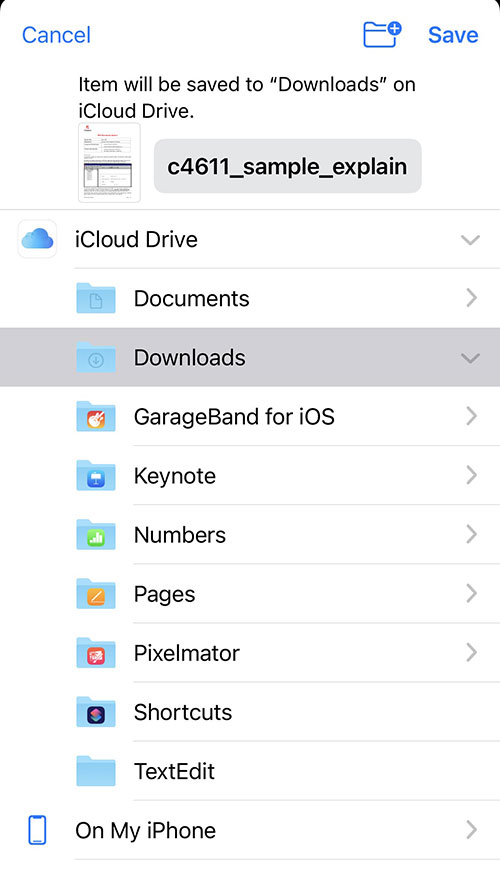
    Pick a location.

    iCloud Drive, Google Drive or any other service you have connected.

  5. 05
    Tap Save.
Saving a PDF to an iCloud folder on iPhone

To open the file without internet, long-press it in the Files app and choose Download Now.

Saving to the iPhone itself

If you would rather the file stays only on the phone, save it locally. You can open it from the Files app or apps such as Adobe Acrobat Reader.

  1. 01
    Open the PDF.
  2. 02
    Tap the Share button.
  3. 03
    Choose Save to Files.
  4. 04
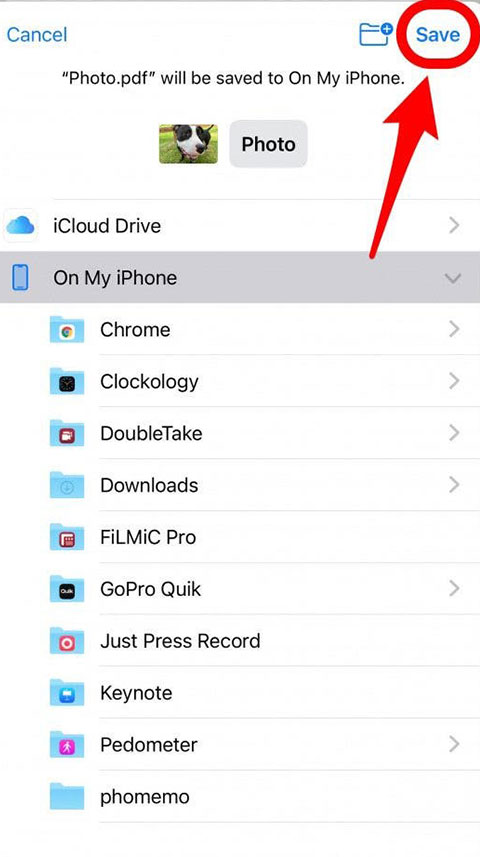
    Choose On My iPhone.
  5. 05
    Pick a folder and tap Save.
Saving a PDF to iPhone storage

Bonus: turn a web page into a PDF

Want to keep a recipe, an article or a booking? Safari can turn any page into a PDF.

  1. 01
    Open the page in Safari.
  2. 02
    Tap the Share button.
  3. 03
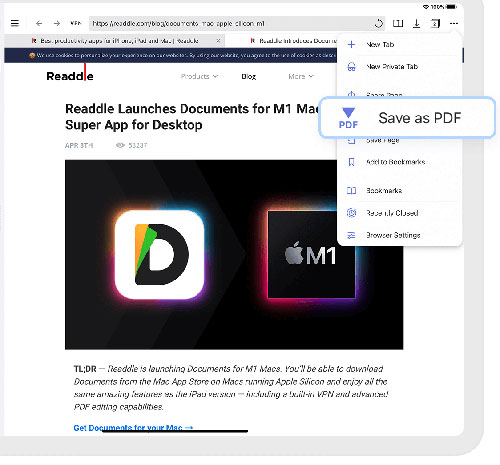
    Tap Options at the top and pick PDF, or go straight to Save to Files.
  4. 04
    Choose where to save it.
Saving a web page as PDF on iPhone

If your iPhone is running out of space, see the options under iPhone upgrade.

Need help with your Apple device?

Call us or drop by our Kallithea or Chalandri store in Athens for a free check-up and quote.

Kallithea

Address: 46 Syntagmatarchou Davaki St., Kallithea

Opening hours:
Monday – Friday: 09:00 – 21:00Saturday: 10:00 – 15:00

Chalandri

Address: 12 Kolokotroni St., Chalandri

Opening hours:
Monday – Friday: 09:30 – 17:30Saturday: 09:30 – 17:00

Apple Mac Service Repair

Specialist service for Mac, MacBook, iMac, iPhone and iPad since 1999. Repairs, upgrades and technical support in Kallithea and Chalandri, Athens.

Kallithea

46 Syntagmatarchou Davaki St., Kallithea

210 958 8555

Monday – Friday: 09:00 – 21:00Saturday: 10:00 – 15:00

Facebook · Instagram · Get directions

Chalandri

12 Kolokotroni St., Chalandri

210 689 9416

Monday – Friday: 09:30 – 17:30Saturday: 09:30 – 17:00

Facebook · Instagram · Get directions