Why an SSD
Speed
Start-up in seconds instead of minutes, and apps that open instantly.
Reliability
With no moving parts an SSD copes far better with knocks and travel.
Capacity
You can also gain more space for photos and files.
What we do
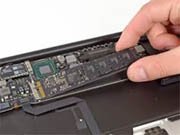
We replace the existing drive with an SSD of the capacity you need. If you like, we clone the entire old drive to the new one so the Mac opens exactly as you left it, with your apps, files and settings.
You get your old drive back. We can put it in an external enclosure so you can use it as a Time Machine backup.
Which models qualify
On Intel iMac, Mac mini and MacBook Pro models the upgrade is usually possible. Some MacBook Air and Retina MacBook Pro models use proprietary Apple drives, while Apple Silicon Macs have built-in storage. Tell us your model and we will let you know.
For even better results, pair the SSD with a memory upgrade.
Frequently asked questions
Will I have to reinstall my apps?
No. We transfer everything, so the Mac opens with your own apps and files.