Why not just click “Update”?
Upgrading from the App Store looks easy, but on older machines or computers running professional software it can cause trouble. Printer drivers, audio and video plug-ins or older app versions often do not get along with the new system.
Our process
- Check that your model supports the version you want
- Check compatibility of the apps you use every day
- Full backup before the upgrade
- Install the new version and all pending updates
- Set up Wi‑Fi, printers and peripherals
- Final performance and stability test
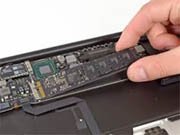
On an older Mac a software upgrade alone can make things slower. In that case we suggest pairing it with more memory or an SSD so the new system runs comfortably.
Frequently asked questions
Can I go back to my previous version?
Yes, as long as there is a backup from before the upgrade, which is why we always make one.